Working with AI coding agents on infrastructure
AI coding agents like Claude can now write Terraform, read documentation, run tests and explain a failed plan faster than any of us. On a recent Oracle Cloud (OCI) data platform project, an agent did most of the typing: compartments, networks, IAM policies, Vault, Autonomous Database, logging, preflight scripts and the documentation around it all.
Infrastructure does not forgive speed without control. A wrong IAM policy, a destroyed bucket or an apply against the wrong state file is not fixed by "sorry, let me try again". So before the agent wrote its first line, we decided who does what:
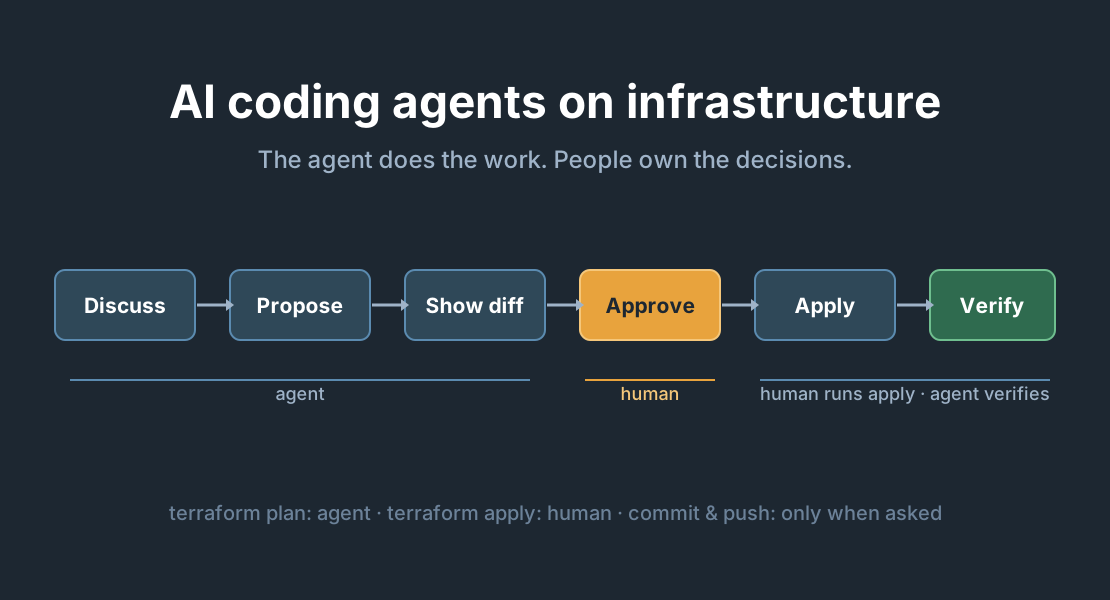
The agent does the work. People own the decisions, the applies and the record.
This article describes the rules that made that work in practice. None of them are specific to OCI or to one AI tool, so you can copy them into your own repository.
1. Give the agent a rulebook in the repository
Most coding agents read an instruction file from the repository root, often called AGENTS.md or CLAUDE.md. This is where your rules live, and they are versioned and reviewed like any other code. A rule that only exists in a chat is forgotten in the next session.
Our file is short and concrete. A few examples:
## Documentation
Always read context from doc/ when starting a new prompt.

## Test execution scope
Never run every numbered Feature Request test directory in one invocation.
./test.sh selects only the current shared baseline.

## Explicit permission for commits and live writes
Commit, pull, rebase, push, or run anything that writes to an external
system only when the user's current message names that action.
Approval for one action does not extend to the next.
The best rules came from mistakes. Each time the agent did something we did not want, we asked: which rule would have prevented this? Then we wrote that rule down. After a few weeks the file described how we actually wanted to work.
2. The agent plans. A human applies.
This is the most important rule, and it is not up for discussion:
- The agent may run formatting, validation, tests and read-only
terraform plan. - The agent never runs
apply,destroy,importor anything else that changes live resources or Terraform state. Not directly, and not hidden inside a script or a test. - For an apply, the agent writes the exact commands. A human runs them and pastes the output back. The agent then reviews the result.
One detail matters here: the agent must read a wrapper script before running it. A script called test.sh --local can still call the cloud. "Local" in the name is not proof.
3. Documentation is the contract
We split the repository's documentation in two:
doc/describes what the platform is meant to be: the design.delivery/records what was actually done: feature requests, decisions, test evidence and the as-built documentation.
An agent can rewrite a design document in seconds, and a quietly changed design is worse than no design. So no file in either folder changes without this workflow:
Discuss
→ Propose
→ Show the full-file red/green diff
→ Recap the change in plain language
→ Receive explicit approval
→ Apply exactly the approved change
→ Show and verify the result
→ Commit only when explicitly requested
Three details make this work:
- One file per approval. Ten changes in one batch get skimmed. One diff gets read.
- The whole file is shown, not just the changed lines, so you can see the change in context.
- "Sounds good" is not approval. Questions, brainstorming and "what do you think?" are not approval. Only an unambiguous "approved" on the diff that was shown counts.
There is one exception: a todo.md that the agent keeps up to date without asking. It records open work and every decision we are waiting for, so the state of the project survives beyond a single chat session.
4. "Grill me": let the agent question the design
Agents are very good at reading 50 documents and finding where they disagree. We turned that into a command. When we write grill me, the agent interrogates the design before anything is written:
- One question at a time.
- Each question names the file and quotes the text that causes the conflict.
- It explains why two statements cannot both be true, or what the missing answer blocks.
- Where there are options, it lists them with a recommendation.
- A guess is marked as a guess and is never written down as a decision.
A grilling session ends when each subject has exactly one owning document and nothing contradicts it. It is the cheapest quality assurance we have: it finds design problems before they become Terraform.
5. Write feature requests an agent can implement
An agent fills gaps with guesses that look plausible. The fix is to leave fewer gaps. Before implementation starts, a feature request must state:
- Purpose, scope and what is explicitly excluded
- The design documents it builds on
- Inputs, expected results and failure behaviour
- Dependencies and unresolved decisions
- Observable acceptance criteria
- How it will be tested and verified
Then comes the step most teams skip: an implementation-decision review. Before writing code, the agent lists every non-trivial choice the design does not already make, with the options, a recommendation, the risk and how it will be tested. A human approves those decisions. If the agent finds a new decision halfway through, it stops and asks. A decision must never be hidden inside Terraform.
After that, the agent works test-first, one behaviour at a time:
- Write a test from an acceptance criterion.
- Run it and confirm that it fails for the right reason. A missing credential is not the right reason.
- Make the smallest change that passes.
- Run the test and the relevant existing tests.
And one rule we would not do without: a test that could not run is "blocked", not "passed". Agents are optimistic reporters. Mocks and local checks do not prove that the deployed infrastructure works, so every report states separately what was verified locally, what was verified against OCI and what remains unverified.
6. Permission is per action
"Fix it and push" and "fix it" are different requests. In our setup:
- Approval to edit is not approval to commit.
- Approval to commit is not approval to push.
- A short "ok" after the agent offered three options is not approval. The agent asks which option you meant.
This sounds bureaucratic, but in practice it costs a few seconds and removes a whole class of "why did that get pushed?" moments. It also lets the agent work fast: when edit, commit and push are all explicitly requested, it does all three in one go.
7. Evidence, not claims
Each feature request ends with an implementation report, built from a template: what was created, the final configuration, the decisions made, any approved deviations, and the verification results with date and evidence. Anything not run is marked "Not run" or "Blocked". Credentials, state files and saved plans never go in.
The report is useful to the reviewer, but mostly to the next session. A new agent session, or a new colleague, can pick up the work from the record instead of from someone's memory.
What we learned
- Speed comes from clear boundaries. When the agent knows exactly what it may do, it does it quickly, and you stop reviewing out of fear.
- Put rules in the repository, not in prompts. They survive new sessions, new tools and new colleagues.
- Humans keep the irreversible actions. Plan is cheap. Apply, destroy and push need a person.
- Small diffs, explicit approval. One file at a time is the only review that actually gets read.
- Make the agent ask, not guess. Missing or contradictory requirements are raised, never silently decided.
- "Blocked" is an honest result. An untested change that is reported as passed is the most expensive bug you can have.
Getting started
If you want to try this on your own infrastructure repository, start small:
- Add an
AGENTS.mdwith three rules: readdoc/first, never apply, and commit or push only when asked. - Separate design (
doc/) from delivery records (delivery/). - Require a full-file diff and explicit approval for design changes.
- Add a rule each time the agent surprises you.
Want to talk about using AI agents on your Oracle Cloud platform? Get in touch below.
Best Regards
Henrik