Real-time possibilities in OHIP
OHIP, Oracle Hospitality Integration Platform, is your entry point for accessing information in Opera Cloud.
The OHIP API enables access to any business object and supports real-time event processing. This article will focus on real-time processing.
You have two ways of getting business object events from OHIP: the Streaming API or the Poll API.
Get your access information
Before you can start working on these APIs you need to access OHIP for your Opera Cloud instance. Choose "Oracle Hospitality Developer Portal" in the side menu. Click "Environments", and you should see your environment(s).
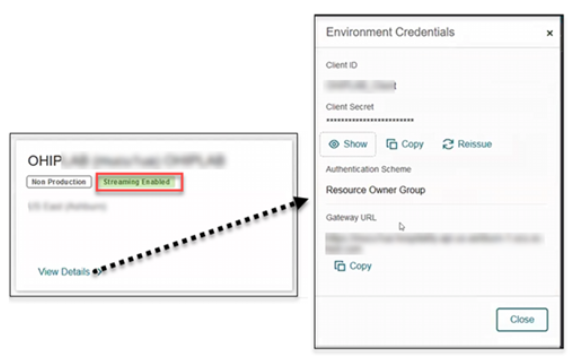
Click on "View details" to get Client ID, Client Secret and Gateway URL. To get streaming enabled, you must contact Oracle Support.
Go back to "Applications" and click "Register Application".
Streaming API
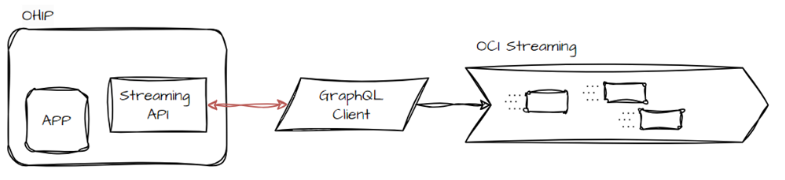
This API allows you to set up a web socket connection to a GraphQL service, providing real-time updates on business object changes from Opera Cloud. The steps required for this to work are:
- Create an APP in OHIP. This makes it possible to subscribe to specific business events and hotels (like RESERVATION events in hotel ABC).
- Get the APP key from OHIP.
- Create a web socket client. I recommend starting in Postman or another API tool, so you know that it works. When this works, create a client in NodeJS, as it's very powerful at dealing with real-time processing. Also see Luis Weir's demo on GitHub. NB: You can only have one client connected to the same OHIP APP.
Payload structure
Below is the payload structure when requesting events from the Streaming API.
"newEvent": {
    "metadata": {
        "offset": "690",
        "uniqueEventId": "fa6c192e-8859-4142-ab30-0280d8fb18d8"
    },
    "primaryKey": "8888888",
    "moduleName": "PROFILE",
    "eventName": "NEW PROFILE",
    "timestamp": "29-JUL-24 01.00.24.463535 PM",
    "hotelId": "",
    "detail": [
        {
            "oldValue": "",
            "newValue": "Henrik",
            "elementName": "FIRST NAME"
        }, ...
    ]
}
Because this is like using Apache Kafka, you have an offset and a unique EventId. The offset can be used to decide what payloads to fetch.
Save and use the offset in your Subscribe payload:
{
    "id": "<CLIENT-ID>",
    "type": "subscribe",
    "payload": {
        "variables": {},
        "extensions": {},
        "operationName": null,
        "query": "subscription { newEvent(input: { chainCode: \"{{CHAINCODE}}\", offset: \"{{OFFSET}}\" }) { metadata { offset uniqueEventId} primaryKey moduleName eventName timestamp hotelId detail { oldValue newValue elementName } } }"
    }
}
Read more about the payloads on this page.
Poll API
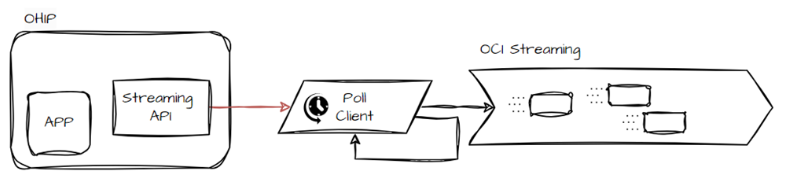
This API is much simpler to begin with at various levels and can be implemented in any programming language, as it uses REST API calls to retrieve events. The steps required for this to work are:
- Create an APP in OHIP. This makes it possible to subscribe to specific business events and hotels (like NEW PROFILE, RESERVATION events in hotel ABC).
- Get the APP key from OHIP.
- Create a REST API client. I recommend starting in Postman or another API tool, so you know that it works. When this works, create a client in any language you want. Create a client in OCI Functions, OCI Data Flow (Spark) or maybe use an integration in Oracle Integration Cloud. No limits in this choice 😊
The payload format received when polling the API
{
    "header": {
        "moduleName": "Reservation",
        "actionType": "CHECK IN",
        "actionId": 3155720283,
        "primaryKey": "329226424",
        "publisherId": 73120,
        "createdDateTime": "2024-09-25 13:37:59.0",
        "hotelId": "*****",
        "eventName": "CHECK IN"
    },
    "details": [
        {
            "dataElement": "NAME",
            "oldValue": "Dyrnes",
            "newValue": "Dyrnes"
        }, ...
    ]
}
In this payload you don't have an offset. You poll for payloads and receive them once!
Read more about the Poll API on this page.
Processing events
For both solutions you need to fetch the payload and forward it to a data lake or something else.
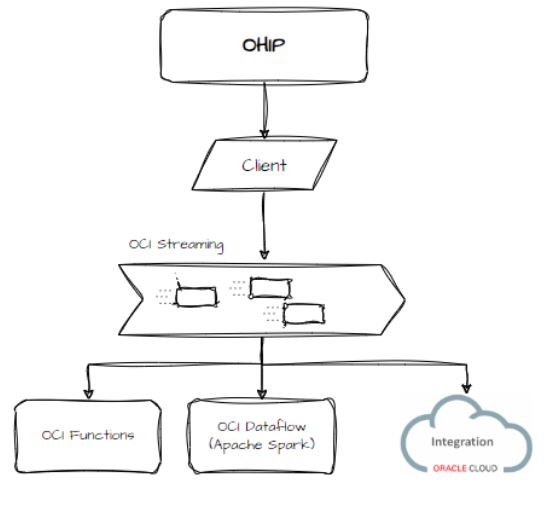
Depending on your subscription settings in OHIP, you will receive a lot of events. I recommend sending the payloads to OCI Streaming (Apache Kafka), and then developing consumers as needed.
Using Oracle Cloud, you can set up consumers in OCI Functions, OCI Data Flow (Apache Spark), Oracle Integration Cloud or create your own consumer.
Keys to success
- Get Streaming enabled by contacting Oracle Support.
- Start with Postman. Get all requests to work before starting development.
- Streaming API: Use TypeScript for optimized websockets. You need to implement async functions, so you can receive payloads at high speed.
- Streaming API: Be prepared to run this in a container environment.
- Poll API: This can run as an OCI Function or in Integration Cloud. Don't use a server for this.
- Push payloads to an Apache Kafka service like OCI Streaming.
This is a high-level overview of the steps needed to get real-time processing to work. A deep dive article will be published soon!
Links
- Oracle Hospitality Integration Platform
- User guide
- Getting started
- Streaming API
- Poll API
- API information in Postman collection
Best Regards
Henrik